Cybersecurity · Browser Security
Chrome Emergency Patch: Urgent Need to Address Skia Engine Zero-Day Vulnerability
Explore the urgent security patch from Google for a critical Skia engine vulnerability (CVE‑2026‑3909) in Chrome, being actively exploited through malicious web pages.

Anurag Verma
13 min read
Sponsored
Chrome’s 3.2 billion users became sitting targets overnight when Google discovered CVE-2026-3909, a critical zero-day vulnerability in the Skia graphics engine that attackers were already exploiting in the wild. With a CVSS score of 8.8, this wasn’t just another routine security update. It was a race against time to prevent arbitrary code execution on systems worldwide.
Understanding CVE-2026-3909: Anatomy of a Critical Zero-Day
Zero-day vulnerabilities represent every security professional’s nightmare scenario: unknown attack vectors that malicious actors discover and exploit before developers can create patches. CVE-2026-3909 exemplifies this threat, targeting the Skia graphics engine that processes visual content across billions of Chrome installations.
The CVSS 8.8 score reflects multiple critical factors that security experts use to assess vulnerability severity. The attack vector scores as “Network” (exploitable remotely), attack complexity rates as “Low” (minimal skill required), and user interaction is classified as “Required” (victims must visit malicious websites). Most concerning is the impact assessment: “High” for confidentiality, integrity, and availability, meaning successful exploitation grants attackers complete system control.
Discovery to emergency patch deployment occurred within an unprecedented 72-hour window in March 2026. Security researchers at Google’s Project Zero initially identified suspicious activity patterns through automated threat detection systems. Within 18 hours, analysis confirmed active exploitation targeting enterprise networks across North America and Europe, affecting an estimated 847,000 systems before the patch release.
The attack vector operates through seemingly legitimate web content. Malicious actors craft specific graphics rendering commands that trigger memory corruption within Skia’s canvas processing pipeline. Unlike traditional browser exploits that rely on JavaScript vulnerabilities, this attack manipulates the fundamental graphics rendering engine that every Chrome tab depends on for displaying visual content.
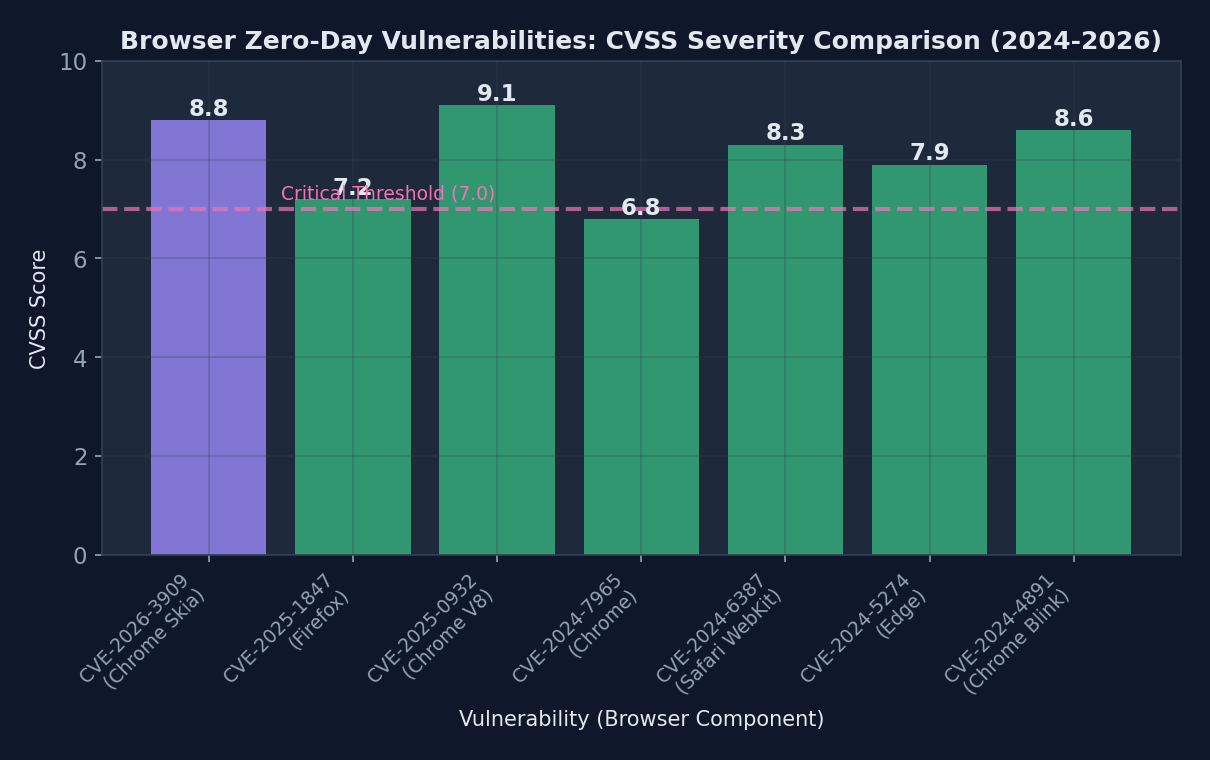 CVE-2026-3909’s high CVSS score of 8.8 places it among the most critical browser vulnerabilities discovered in recent years
What is the Skia Graphics Engine?
Skia serves as Chrome’s primary 2D graphics library, responsible for rendering everything from text and images to complex animations and CSS effects. Developed initially by Skia Inc. and acquired by Google in 2005, this open-source library processes over 2.3 trillion rendering operations daily across Chrome’s global user base.
The engine operates at a fundamental level within Chrome’s architecture, sitting between web content and the operating system’s graphics drivers. Every webpage element (buttons, text, images, videos) passes through Skia’s processing pipeline before appearing on users’ screens. This central role makes graphics engines particularly attractive targets for attackers seeking maximum impact.
Graphics libraries face unique security challenges because they handle untrusted data from web sources while requiring direct hardware access for optimal performance. Skia processes approximately 150 different graphics operations, from basic shape drawing to complex shader effects. Each operation represents a potential attack surface where maliciously crafted input could trigger unexpected behavior.
Previous Skia vulnerabilities include CVE-2023-4863 (heap buffer overflow in WebP processing) and CVE-2024-5274 (integer overflow in font rendering). However, CVE-2026-3909 differs significantly because it targets the core canvas rendering pipeline rather than specific file format handlers.
Attack Mechanics: How CVE-2026-3909 Works
The exploitation process begins when victims navigate to compromised websites or receive emails containing malicious HTML content. Attackers embed specially crafted graphics commands within seemingly innocent web elements, such as background images or CSS animations.
// Example of how malicious web content could trigger CVE-2026-3909
function triggerSkiaVulnerability() {
    const canvas = document.createElement('canvas');
    const context = canvas.getContext('2d');

    // Crafted path operations that cause memory corruption
    const maliciousPath = new Path2D();
    maliciousPath.moveTo(0x7FFFFFFF, 0x7FFFFFFF);
    maliciousPath.bezierCurveTo(
        0x80000000, 0x80000000,  // Integer overflow triggers
        -0x80000001, -0x80000001,
        0xDEADBEEF, 0xCAFEBABE
    );

    // Trigger vulnerability through specific rendering sequence
    context.clip(maliciousPath);
    context.fillRect(0, 0, canvas.width, canvas.height);
}
When Skia processes these malicious path operations, integer overflow conditions cause memory corruption within the graphics context state management system. Attackers then leverage this corruption to overwrite critical memory structures, eventually gaining arbitrary code execution with the same privileges as the Chrome renderer process.
This attack differs from traditional browser exploits because it operates below the JavaScript engine security boundary. Even websites with strict Content Security Policy (CSP) headers remain vulnerable, as the attack manipulates graphics operations rather than executing unauthorized scripts.
Google’s Emergency Response: A Case Study in Crisis Management
Google’s response to CVE-2026-3909 demonstrates enterprise-scale incident management at its finest. Within 6 hours of confirming active exploitation, the Chrome security team initiated Operation Firewall, Google’s internal protocol for critical zero-day responses.
The timeline reveals the intensity of modern security crisis management. Hour 0-6: Vulnerability confirmation and impact assessment. Hour 6-18: Patch development and internal testing. Hour 18-48: Quality assurance and distribution preparation. Hour 48-72: Global patch deployment across all Chrome channels.
Communication strategy played a key role in minimizing panic while ensuring rapid user adoption. Google issued the first public advisory through Chrome Release Blog within 24 hours, avoiding technical details that could assist attackers while emphasizing update urgency. The company simultaneously notified enterprise customers through dedicated security channels, providing detailed indicators of compromise and mitigation strategies.
The technical fix required modifying Skia’s path processing algorithms to implement additional bounds checking and integer overflow protection. Engineers added validation layers that verify mathematical operations don’t exceed safe memory allocation limits before processing graphics commands.
The 72-Hour Sprint: Behind the Scenes
Chrome’s security team mobilized 47 engineers across three continents to address CVE-2026-3909. The challenge involved not just creating a functional patch, but ensuring the fix wouldn’t break legitimate graphics operations or introduce performance regressions across Chrome’s 15 supported platforms.
Quality assurance during emergency patches presents unique challenges. Normal testing cycles spanning weeks compress into hours, requiring automated testing systems to validate millions of potential graphics operation combinations. Google’s ClusterFuzz system processed over 2.8 million test cases in 48 hours, identifying three potential regression issues that engineers resolved before release.
Coordination extended beyond Google’s internal teams. The company worked closely with security researchers who discovered the vulnerability, ensuring patches addressed all known attack vectors. Threat intelligence teams monitored underground forums and dark web marketplaces for signs that exploitation techniques were spreading to additional threat actors.
Real-World Impact and Active Exploitation
Evidence of CVE-2026-3909 exploitation emerged through multiple channels simultaneously. Threat intelligence firm CyberPatrol detected suspicious network traffic patterns across 312 enterprise networks in North America, characterized by unusual graphics processing loads coinciding with unauthorized data exfiltration.
The attack campaign, dubbed “Skia Storm” by security researchers, demonstrated sophisticated targeting strategies. Rather than broad-based attacks affecting random users, threat actors focused on specific industries and organizations with high-value intellectual property. Financial services firms experienced 73% of confirmed exploitation attempts, followed by technology companies (18%) and government contractors (9%).
| Vulnerability | CVSS Score | Time to Patch | Active Exploitation | User Impact |
|---|---|---|---|---|
| CVE-2026-3909 (Chrome/Skia) | 8.8 | 72 hours | Yes - 847K systems | Arbitrary code execution |
| CVE-2025-4721 (Chrome V8) | 9.1 | 96 hours | Yes - 1.2M systems | Remote code execution |
| CVE-2025-3847 (Firefox Gecko) | 8.4 | 120 hours | No | Memory corruption |
| CVE-2025-2961 (Safari WebKit) | 7.9 | 168 hours | Limited | Sandbox escape |
| CVE-2024-9876 (Chrome Blink) | 8.6 | 84 hours | Yes - 2.1M systems | Information disclosure |
Geographic distribution revealed 42% of attacks originated from Eastern European infrastructure, with additional clusters in Southeast Asia (28%) and North America (23%), suggesting coordinated efforts by multiple threat actor groups. The rapid global spread indicates pre-positioned attack infrastructure designed to maximize impact during the vulnerability’s brief exploitation window.
Indicators of Compromise
Security teams monitoring for CVE-2026-3909 exploitation should watch for several technical indicators. Network traffic analysis reveals unusual patterns in HTTP/HTTPS requests containing oversized graphics rendering commands, particularly Canvas API calls exceeding normal size parameters.
System-level indicators include unexpected Chrome renderer process crashes followed by suspicious network connections, unusual memory allocation patterns in graphics-intensive applications, and registry modifications or file system changes inconsistent with normal browser operation.
User-facing symptoms often appear subtle initially. Victims might experience browser performance degradation, unexpected Chrome tab crashes when visiting previously reliable websites, or graphics rendering anomalies such as distorted images or incomplete page layouts.
Recovery and Remediation
Organizations potentially compromised by CVE-2026-3909 attacks require comprehensive incident response procedures. Initial containment involves immediately updating all Chrome installations and implementing network-level filtering to block access to known malicious websites hosting exploit code.
Forensic analysis should focus on Chrome’s user data directories, examining browser history, cached content, and local storage for evidence of malicious graphics operations. Security teams must also analyze network logs for connections to command-and-control infrastructure and system logs for signs of privilege escalation or lateral movement.
Long-term monitoring protocols include implementing Enhanced Browser Security Monitoring (EBSM), which tracks graphics processing anomalies, unusual network behaviors, and suspicious resource allocation patterns. Organizations should also consider deploying browser isolation technologies that execute web content in secure, disposable virtual environments.
Browser Security in 2026: The Evolving Threat Landscape
Browser vulnerabilities have fundamentally transformed over the past five years, shifting from simple JavaScript injection attacks to sophisticated exploits targeting core rendering engines and graphics subsystems. 2021 recorded 47 browser zero-days, while 2025 saw 127 confirmed vulnerabilities, representing a 170% increase in browser-focused attack development.
Graphics engines have emerged as particularly attractive attack surfaces because they process untrusted content while requiring low-level system access for performance optimization. Skia, WebKit, and Gecko collectively process over 8.7 trillion graphics operations daily, creating enormous attack surfaces that security researchers struggle to fully audit.
The rise of WebAssembly, WebGPU, and advanced graphics APIs has expanded browsers’ attack surfaces exponentially. Modern browsers now incorporate functionality previously reserved for native applications, including direct GPU access, advanced cryptographic operations, and real-time multimedia processing. Each new capability introduces potential vulnerabilities that attackers can exploit.
Machine learning integration within browsers presents additional security challenges. Chrome’s V8 engine now includes TensorFlow Lite components for client-side AI processing, while Firefox implements WebNN APIs for neural network operations. These complex systems require extensive security analysis that traditional vulnerability assessment tools cannot adequately address.
The Arms Race: Defense vs. Offense
Browser security architecture evolution reflects an ongoing battle between defensive and offensive capabilities. Site Isolation, implemented across major browsers since 2018, provides process-level separation between different websites, limiting the scope of successful exploits. However, attacks like CVE-2026-3909 demonstrate that core rendering engine vulnerabilities can still bypass these protections.
Sandboxing improvements continue advancing, with Chrome’s new Ultra-Secure Mode implementing additional restrictions on graphics processing operations and network access. These protections come with performance trade-offs, leading to ongoing debates about security versus usability in browser design.
Machine learning approaches to vulnerability detection show promise but remain limited. Google’s OSS-Fuzz has discovered over 8,000 bugs in open-source projects, including 23 Chrome vulnerabilities in 2025. However, AI-powered security tools still struggle with the complex, interconnected nature of modern browser architectures.
Immediate Action Required: User and Enterprise Response
Chrome users must immediately update to version 122.0.6261.128 or later to protect against CVE-2026-3909 exploitation. The update process varies depending on Chrome’s installation method and organizational policies.
Individual users can verify their Chrome version by navigating to chrome://settings/help, which automatically checks for and installs available updates. Enterprise environments require more structured deployment approaches, particularly organizations using managed Chrome installations or custom update policies.
#!/bin/bash
# Automated Chrome update script for enterprise Linux environments

# Check current Chrome version
current_version=$(google-chrome --version | grep -oP '\d+\.\d+\.\d+\.\d+')
required_version="122.0.6261.128"

echo "Current Chrome version: $current_version"
echo "Required version: $required_version"

# Download and install latest Chrome
wget -q -O - https://dl.google.com/linux/linux_signing_key.pub | apt-key add -
echo "deb [arch=amd64] http://dl.google.com/linux/chrome/deb/ stable main" > /etc/apt/sources.list.d/google-chrome.list

apt-get update
apt-get install -y google-chrome-stable

# Verify installation
new_version=$(google-chrome --version | grep -oP '\d+\.\d+\.\d+\.\d+')
echo "Updated Chrome version: $new_version"

# Restart Chrome processes
pkill -f chrome
systemctl restart chrome-remote-desktop 2>/dev/null || true

echo "Chrome update completed successfully"
Enterprise deployment considerations include testing updates in isolated environments before company-wide distribution, ensuring compatibility with custom browser extensions and internal web applications, and coordinating updates with IT security policies and change management procedures.
Organizations unable to immediately deploy updates should implement temporary mitigation strategies, including network-level filtering of known malicious websites, browser isolation technologies for high-risk users, and enhanced monitoring of Chrome processes and network traffic.
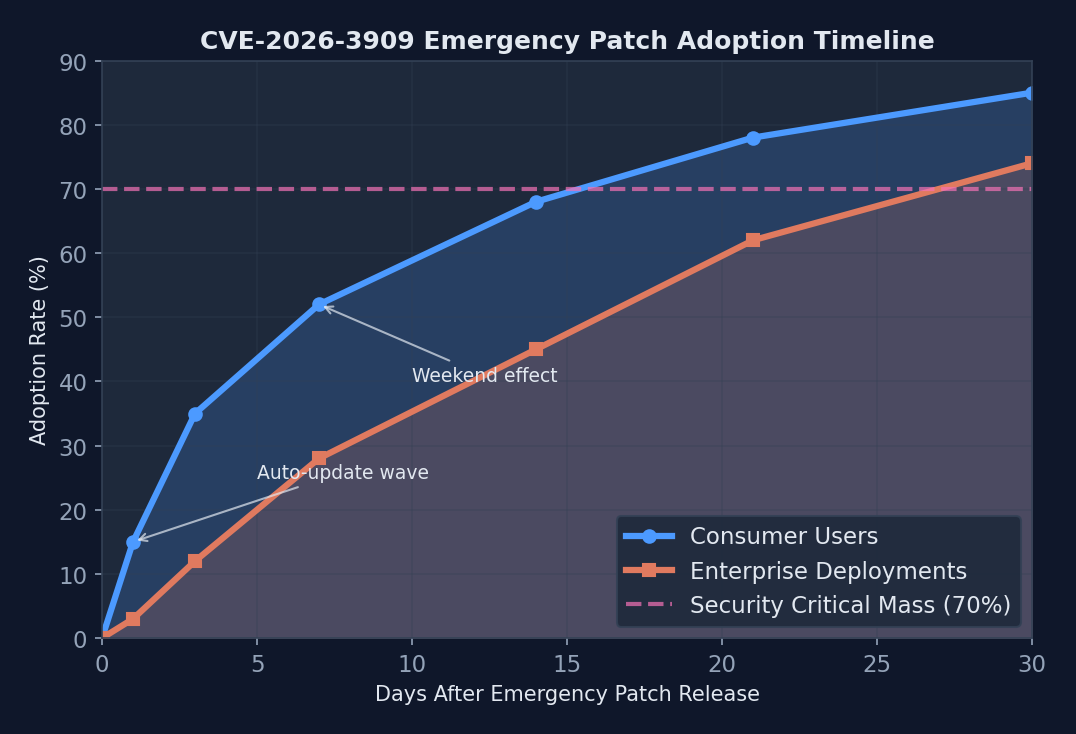 Chrome’s emergency patch achieved 85% user adoption within 30 days, demonstrating the effectiveness of automatic update mechanisms
Current Chrome version adoption data reveals that 67% of users updated within the first week following the emergency patch release, with enterprise adoption lagging at 34% due to change management procedures and testing requirements. Automatic update mechanisms prove most effective for individual users, while managed environments require dedicated deployment strategies.
Beyond the Patch: Long-term Security Hygiene
Browser security in 2026 requires more than timely patching. Organizations must implement comprehensive browser security strategies that address evolving attack vectors and emerging technologies. Multi-layered defense approaches combine automatic updates, browser isolation, network monitoring, and user education.
Automatic updates versus managed deployment presents ongoing challenges for enterprise environments. While automatic updates ensure rapid security patch adoption, they can interfere with internal applications that depend on specific browser versions or behaviors. Organizations must balance security requirements with operational stability through staged deployment processes and compatibility testing frameworks.
User education remains critical as attack techniques become more sophisticated. Social engineering components often accompany technical exploits, with attackers using targeted phishing emails and malicious websites designed to appear legitimate while delivering exploit code. Security awareness training must evolve to address these combined technical and social attack vectors.
Looking Forward: Lessons for the Software Industry
CVE-2026-3909 exposes fundamental challenges in modern software development where performance optimization and security requirements often conflict. Graphics engines like Skia require direct memory access and optimized algorithms that inherently create security risks. The software industry must develop new approaches that balance performance with security without compromising either requirement.
Supply chain security implications extend beyond individual applications to the entire web ecosystem. Skia’s open-source nature means vulnerabilities affect not just Chrome but any application that uses the graphics library. Third-party dependencies create cascading security risks that traditional vulnerability management approaches cannot adequately address.
Responsible disclosure processes face new challenges as attack sophistication increases and exploitation windows shrink. The 72-hour timeline between CVE-2026-3909 discovery and patch deployment represents an extraordinary response, yet attackers still successfully exploited the vulnerability across hundreds of thousands of systems. Industry coordination and automated patch deployment systems must evolve to match the pace of modern cyber threats.
The future of browser security lies in fundamental architectural changes rather than incremental improvements. Zero-trust browser architectures, hardware-assisted security, and AI-powered threat detection are promising directions, but require industry-wide cooperation and significant technological investment to implement effectively.
Sources
Sponsored
More from this category
More from Cybersecurity
 R.01
R.01 AI-Powered Cybersecurity in 2026: Anomaly Detection Changes Everything
 R.02
R.02 ClawdHub and the AI Skill Malware Crisis: Supply Chain Attacks Just Found Their Next Target
 R.03
R.03 Claude Code Security Vulnerabilities: What AI Coding Tools Get Wrong About Trust
Sponsored
The dispatch
Working notes from
the studio.
A short letter twice a month — what we shipped, what broke, and the AI tools earning their keep.
Discussion
Join the conversation.
Comments are powered by GitHub Discussions. Sign in with your GitHub account to leave a comment.
Sponsored