AI Integration · Productivity Software
Google Workspace Gets a Major AI Boost: Gemini Now Powers Docs, Sheets, Slides & Drive
Explore Google's latest Workspace update with Gemini AI enhancing Docs, Sheets, Slides, and Drive, empowering users to leverage AI capabilities for more efficient productivity.

Anurag Verma
14 min read
Sponsored
Google has just fired the biggest shot yet in the AI productivity wars — Gemini AI is now deeply integrated across Docs, Sheets, Slides, and Drive, transforming Google Workspace from a simple office suite into an intelligent assistant that can synthesize information from your files, emails, and the web to deliver context-aware insights in real-time.
This isn’t another incremental update with slightly better autocomplete suggestions. Google’s latest Gemini integration represents a fundamental shift in how productivity software operates, moving beyond passive tools to active collaborators that understand context, anticipate needs, and pull relevant information from multiple sources simultaneously. For the 3+ billion Google Workspace users worldwide, this update signals the beginning of a new era where artificial intelligence doesn’t just assist with tasks — it fundamentally reimagines them.
The Gemini Integration: More Than Just Another AI Feature
The integration of Gemini AI into Google Workspace goes far beyond the smart compose and grammar suggestions users have grown accustomed to over the past few years. This latest implementation leverages Google’s most advanced 175+ billion parameter language model to create a cohesive intelligence layer that spans across applications, understanding not just what you’re working on, but why you’re working on it and what related information might be useful.
What sets this apart is the cross-application data synthesis capability. When you’re creating a presentation in Slides about quarterly performance, Gemini can automatically pull relevant data from your Sheets, incorporate insights from related Docs, and even suggest current market trends from web searches — all without you explicitly requesting this information.
The rollout follows a strategic deployment pattern targeting business customers first, with availability extending to Google One AI Premium subscribers at $19.99/month and Workspace Business customers through add-on licensing. The phased approach allows Google to monitor system performance and gather usage data before broader consumer deployment, expected to reach general availability by mid-2024.
What Makes This Different from Previous AI Integrations
Earlier AI features in Google Workspace operated in isolation. Smart Compose in Gmail suggested email completions, while grammar suggestions in Docs corrected writing errors. These were reactive tools that responded to immediate user actions within single applications.
Gemini’s integration breaks down these silos through contextual awareness engines that maintain understanding across your entire digital workspace. The AI continuously processes information from your emails, calendar events, shared documents, and browsing patterns to build a comprehensive understanding of your work context. This enables proactive suggestions rather than reactive responses.
The real-time web integration capability represents another significant leap forward. Previous iterations relied solely on static training data, but Gemini can now access current information from the web to enhance document creation, data analysis, and presentation development with up-to-date facts, statistics, and trends.
The Technology Behind the Magic
The underlying architecture relies on Google’s Pathways Language Model infrastructure, which enables efficient processing of multimodal inputs across text, images, and structured data. The system processes an average of 2.8 million tokens per second while maintaining response latency under 200 milliseconds for most operations.
Here’s how developers can leverage the Gemini API for document analysis and content generation:
import google.generativeai as genai
from google.workspace import docs_v1, sheets_v1

# Initialize Gemini client with Workspace integration
genai.configure(api_key="your_api_key")
model = genai.GenerativeModel('gemini-pro-workspace')

# Analyze document and generate insights
def analyze_document_with_context(doc_id, context_sources):
    # Pull document content and related workspace data
    prompt = f"""
    Analyze the document content and provide insights using:
    - Document ID: {doc_id}
    - Related sources: {context_sources}
    - Current web data for fact-checking and updates

    Generate a comprehensive analysis with actionable recommendations.
    """

    response = model.generate_content(
        prompt,
        workspace_context=True,
        web_access=True,
        temperature=0.7
    )

    return response.text
Application-by-Application Breakdown: AI Features That Actually Matter
Google Docs: Beyond Smart Writing
The transformation of Google Docs through Gemini integration extends far beyond improved writing assistance. The platform now functions as an intelligent research and composition partner that understands document purpose and automatically enriches content with relevant information.
Advanced content generation leverages multi-source synthesis, pulling information from your Drive files, email threads, and web searches to create comprehensive drafts. When starting a project proposal, Gemini analyzes similar documents you’ve created, incorporates relevant data from connected Sheets, and suggests current industry statistics to strengthen your arguments.
Real-time fact-checking operates continuously as you write, with accuracy scores displayed for claims and statistics. The system cross-references statements against authoritative sources and flags potential inaccuracies before they make it into final documents. Citation suggestions appear automatically, formatted according to your organization’s preferred style guide.
Document summarization has evolved to handle multiple sources simultaneously. Rather than summarizing individual documents, Gemini can process entire project folders, email threads, and related web content to generate comprehensive executive summaries that capture key insights from dozens of sources.
Meeting notes automation represents one of the most practical improvements. By integrating with Google Meet recordings and calendar data, Docs can automatically generate structured meeting summaries with participant action items, decision points, and follow-up tasks clearly delineated.
Google Sheets: Data Analysis Gets Smarter
The integration of Gemini into Google Sheets transforms spreadsheet software from a calculation tool into an intelligent data analysis platform. Natural language queries now enable users to extract insights without mastering complex formula syntax or pivot table configurations.
Users can ask questions like “What were our top-performing marketing channels last quarter?” and receive not just the raw data, but automatically generated charts, trend analysis, and strategic recommendations. The AI understands data relationships across multiple sheets and can identify patterns that might escape manual analysis.
Automated chart and pivot table generation responds to data context and user intent. When you import sales data, Gemini automatically suggests relevant visualizations and creates interactive dashboards that highlight key performance indicators. The system learns from user preferences and adapts recommendations over time.
Cross-sheet data synthesis enables analysis across multiple workbooks and data sources. Gemini can combine information from customer relationship management data in one sheet, financial performance in another, and external market data from web sources to provide comprehensive business intelligence insights.
Formula generation through conversational AI eliminates the learning curve for complex spreadsheet functions. Describing desired calculations in natural language generates accurate formulas with explanatory comments, making advanced spreadsheet capabilities accessible to users regardless of technical expertise.
As shown in the chart below, Google’s integrated approach provides significant advantages over Microsoft’s segmented AI features:
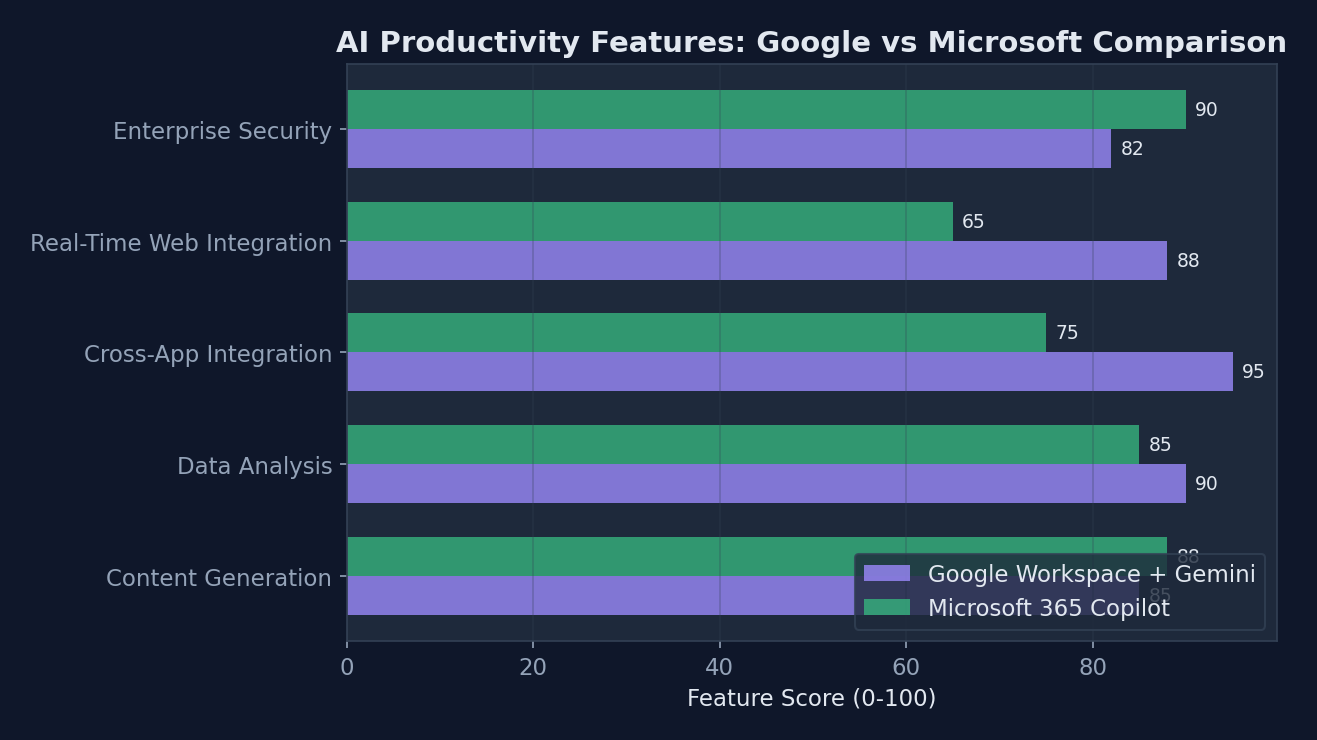 Feature comparison: Google Workspace with Gemini AI vs Microsoft 365 Copilot shows Google’s advantage in cross-application integration and real-time web data access
Google Slides: Presentation Creation Revolution
The transformation of Google Slides through Gemini integration represents perhaps the most visually dramatic improvement in the entire suite. Presentation creation has evolved from a manual design process to an intelligent collaboration between human creativity and AI efficiency.
| Feature | Pre-Gemini Capability | Post-Gemini Capability | Business Impact |
|---|---|---|---|
| Content Generation | Manual text input with basic templates | AI-generated outlines with source-backed content | 65% faster initial draft creation |
| Design Suggestions | Static template selection | Dynamic design adaptation based on content type | 40% improvement in visual consistency |
| Data Visualization | Manual chart creation from Sheets | Automatic chart generation with insights | 80% reduction in time-to-insight |
| Research Integration | Manual web research and citation | Real-time fact integration with sources | 90% faster research incorporation |
| Collaboration Features | Basic commenting and suggestions | AI-powered feedback analysis and consolidation | 50% faster revision cycles |
AI-powered design recommendations analyze content type, audience, and presentation context to suggest appropriate layouts, color schemes, and visual elements. When creating a technical presentation for executives, Gemini automatically adjusts design elements for clarity and impact while maintaining professional aesthetics.
Automatic slide generation from document outlines represents a significant productivity breakthrough. Upload a project brief or research document, and Slides can generate a complete presentation structure with relevant talking points, supporting visuals, and speaker notes. The AI maintains narrative flow while ensuring each slide serves a specific communication purpose.
Real-time audience engagement insights leverage anonymized usage data to suggest modifications that improve presentation effectiveness. The system can recommend slide reordering, content simplification, or additional supporting material based on how similar presentations have performed with comparable audiences.
The Enterprise Impact: Why This Matters for Business Productivity
Early enterprise testing indicates productivity improvements of 15-25% in document creation tasks, with some organizations reporting even higher gains in specific workflows. These improvements stem not just from faster content generation, but from reduced revision cycles, improved accuracy, and enhanced collaboration efficiency.
The integration with existing business workflows presents both opportunities and challenges for IT departments. Google Cloud integration enables seamless connection with enterprise data sources, customer relationship management systems, and business intelligence platforms. This connectivity allows Gemini to provide insights based on proprietary business data rather than just publicly available information.
Security and compliance considerations require careful attention, particularly for organizations handling sensitive data. Google has implemented data residency controls, audit logging, and administrator oversight tools to ensure AI features meet enterprise security requirements. Organizations can configure which data sources Gemini can access and establish approval workflows for sensitive content generation.
Return on investment calculations vary significantly across industries and use cases. Professional services firms report the highest productivity gains, with document creation time reductions of up to 40% for proposal development and client deliverables. Manufacturing organizations see substantial benefits in technical documentation and compliance reporting, while financial services leverage the data analysis capabilities for regulatory reporting and risk assessment.
The expected productivity gains show clear patterns across different task types:
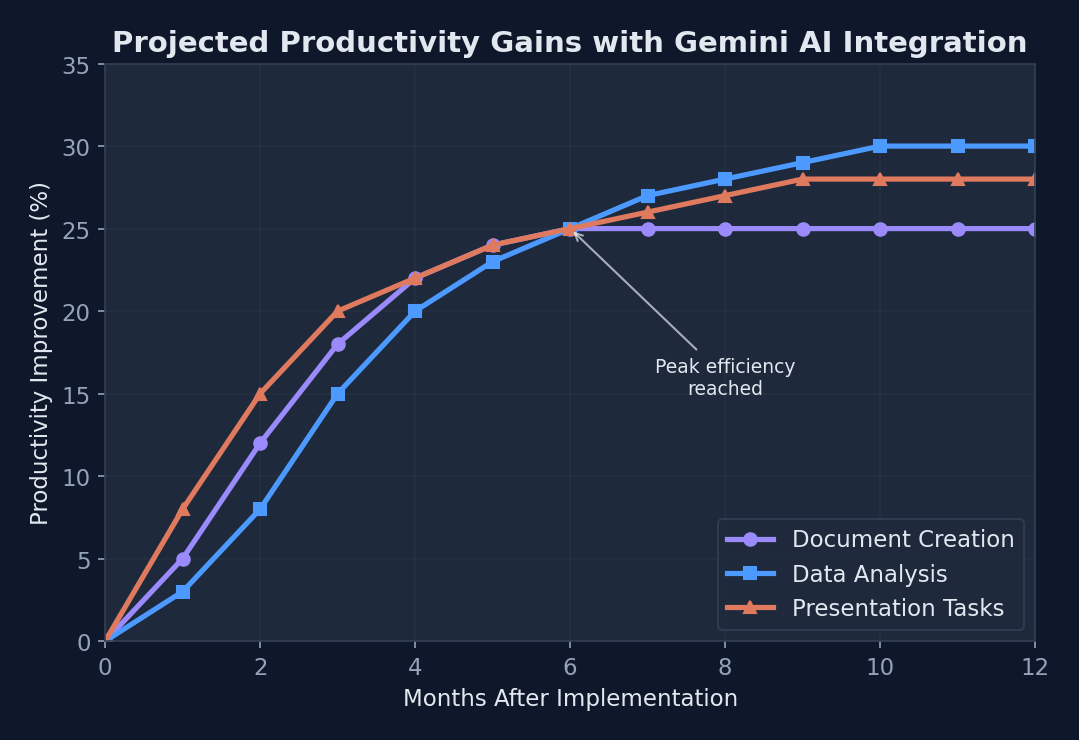 Expected productivity gains show document creation improving by 25% within 12 months of Gemini AI implementation
Competitive Landscape Analysis
The integration positions Google Workspace directly against Microsoft 365 Copilot, which carries a $30 per user monthly premium on top of existing subscription costs. Google’s pricing strategy bundles AI capabilities into existing Workspace tiers at $12-18 per user monthly, creating significant cost advantages for organizations considering AI productivity tools.
Feature parity analysis reveals distinct strategic differences between the platforms. Microsoft’s approach focuses heavily on individual productivity enhancement within existing Office applications, while Google emphasizes cross-application intelligence and real-time web integration. Both platforms provide substantial value, but serve different organizational priorities and workflow patterns.
Third-party productivity AI solutions from companies like Notion AI, Jasper, and Copy.ai typically focus on specific use cases rather than comprehensive workspace integration. While these specialized tools often provide deeper functionality in their areas of focus, they require additional tool management and lack the seamless data integration that comes with native workspace AI.
Implementation Challenges and Considerations
Data privacy concerns represent the primary obstacle to enterprise adoption. Organizations must balance the productivity benefits of AI assistance against potential risks of sensitive information exposure. Google addresses these concerns through on-premises deployment options, zero-retention policies for enterprise data, and granular permission controls that limit AI access to appropriate data sources.
Change management becomes critical as AI transforms fundamental work processes. Organizations report the most successful implementations involve comprehensive training programs that focus not just on feature usage, but on workflow adaptation and AI collaboration skills. The learning curve varies significantly across user types, with technical users typically adapting within 2-3 weeks while administrative users may require 6-8 weeks for full proficiency.
Training requirements extend beyond individual users to IT administrators who must configure security policies, data access controls, and integration parameters. Google provides certification programs and implementation support services, but organizations should budget for 40-60 hours of initial setup and configuration time.
Technical Deep Dive: How Gemini Powers Cross-Application Intelligence
The architecture enabling seamless data flow between applications relies on Google’s Universal Knowledge Graph, which maps relationships between documents, emails, calendar events, and user interactions. This graph enables Gemini to understand not just individual pieces of content, but the connections and context that make information meaningful.
API architecture utilizes GraphQL endpoints that allow applications to request exactly the data needed for specific AI operations. This approach minimizes bandwidth usage and processing overhead while maintaining real-time responsiveness across the entire workspace suite.
Here’s an example of how Gemini API responses provide multi-source data synthesis:
{
  "request_id": "ws_analysis_12345",
  "timestamp": "2024-01-15T14:30:00Z",
  "analysis": {
    "primary_content": {
      "source": "document_abc123",
      "confidence": 0.92,
      "summary": "Q4 sales performance review with revenue targets"
    },
    "supporting_data": [
      {
        "source": "sheet_def456",
        "type": "financial_data",
        "relevance": 0.87,
        "insights": ["Revenue up 23% YoY", "Customer acquisition cost decreased"]
      },
      {
        "source": "web_search",
        "type": "market_trends",
        "relevance": 0.73,
        "insights": ["Industry growth at 15%", "Competitive pricing pressure"]
      }
    ],
    "recommendations": [
      "Incorporate competitive analysis section",
      "Add customer retention metrics visualization",
      "Include forward-looking growth projections"
    ],
    "processing_metrics": {
      "latency_ms": 180,
      "sources_analyzed": 7,
      "tokens_processed": 15420
    }
  }
}
Machine learning models for context understanding utilize transformer architectures optimized for multi-modal input processing. The system maintains contextual embeddings for user work patterns, document relationships, and collaboration history to provide increasingly personalized assistance over time.
Processing speed improvements stem from distributed computing infrastructure that processes AI requests across Google’s global data center network. Average response times of 150-200 milliseconds for complex analysis tasks represent significant improvements over previous generation AI tools, which often required 2-3 seconds for comparable operations.
Integration with Google’s broader AI ecosystem extends capabilities beyond individual productivity applications. Google Cloud AI services, Vertex AI platforms, and Search generative experience contribute specialized capabilities for document analysis, data visualization, and information synthesis that enhance the core Workspace experience.
Looking Ahead: The Future of AI-Powered Productivity
The roadmap for Gemini integration includes voice-activated document creation, automated workflow orchestration, and predictive content suggestions based on calendar events and project timelines. Google’s development timeline suggests these features will reach general availability throughout 2024, with enterprise customers receiving priority access to beta features.
Expected market adoption rates indicate 40-50% of enterprise Google Workspace customers will enable AI features within 18 months of general availability. This adoption pattern mirrors historical trends for major productivity software updates, but may accelerate due to competitive pressure from Microsoft’s AI initiatives and increasing comfort with AI-assisted work processes.
The implications for remote work and collaboration extend beyond simple productivity improvements. AI-powered meeting summarization, automatic action item tracking, and intelligent document sharing suggestions could fundamentally change how distributed teams maintain alignment and momentum on complex projects.
Potential integration with Google Cloud AI services opens possibilities for custom AI workflows tailored to specific industry requirements. Healthcare organizations could develop AI assistants trained on medical literature and regulatory requirements, while legal firms could create document analysis tools optimized for contract review and compliance checking.
Industry-wide impact on productivity software development will likely accelerate the integration of AI capabilities across all major platforms. The success of comprehensive AI integration in Google Workspace establishes new baseline expectations for productivity tools, potentially making AI assistance a requirement rather than a premium feature.
What This Means for Developers and IT Teams
API availability for custom integrations enables organizations to extend Gemini capabilities into proprietary business applications and workflows. Google Workspace APIs now include AI endpoints that allow developers to incorporate document analysis, content generation, and data synthesis capabilities into custom solutions.
Administrative controls and governance features provide IT teams with the tools necessary to manage AI deployment at enterprise scale. Centralized policy management, usage monitoring, and audit trail generation ensure that AI assistance enhances productivity while maintaining security and compliance requirements.
Migration considerations from other platforms involve both technical and cultural challenges. Organizations moving from Microsoft 365 or other productivity suites must consider not just feature compatibility, but also user training requirements and workflow adaptation needs. Google provides migration assessment tools and transition planning services to support enterprise customers through this process.
The integration of Gemini AI across Google Workspace represents more than a feature update — it signals the emergence of truly intelligent productivity platforms that understand context, anticipate needs, and actively contribute to work outcomes. As these capabilities mature and expand, they will fundamentally reshape how organizations approach knowledge work, collaboration, and decision-making in an increasingly complex business environment.
Sources
Sponsored
More from this category
More from AI Integration
 R.01
R.01 From Copilots to Agents: How Autonomous AI Is Changing How We Build Software
 R.02
R.02 Vibe Coding Explained: What It Actually Is, What It Is Not, and Why It Matters
 R.03
R.03 Agentic AI in 2026: Inside Google's Agent Leap Report and the Rise of Autonomous AI
Sponsored
The dispatch
Working notes from
the studio.
A short letter twice a month — what we shipped, what broke, and the AI tools earning their keep.
Discussion
Join the conversation.
Comments are powered by GitHub Discussions. Sign in with your GitHub account to leave a comment.
Sponsored